To filter the Transaction History Report by Wild Card Search:
- At the top of the report list, click into any of the following text-based column options (i.e. Partner Code, Trading Partner).
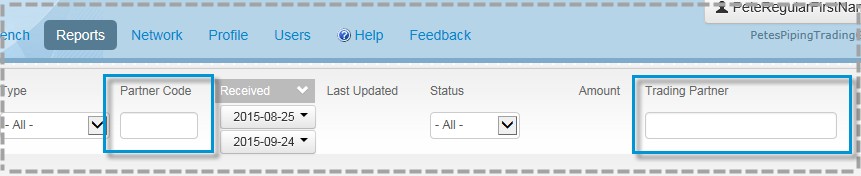
|
NOTE |
The wild card search function does not work in fields that are number-based. |
- Do one of the following in the field to search for documents containing your criteria:
- Place a percent sign (%) in front of your query to find any document containing your criteria
- Place a percent sign (%) after your query to find any document beginning with your criteria
|
NOTE |
The wild card search is not case sensitive. |
- Click the Enter key.
- The report list is reloaded to display documents of the selected wild card criteria only.
When you no longer wish to view the filter, you will need to clear the filters manually.
If you do not clear the filters manually, they will be automatically cleared the next time you log into Workbench.